
Approvals, questions and plans
An agent sometimes needs you before it can go on. ZumiBot shows that as a card in the chat, and the agent waits until you answer. There are three kinds of card: an approval to use a tool, a question, and a plan.
A card can be answered only while its reply is still running. A badge shows next to the chat in the sidebar while a card waits, so you can find it from another chat. The Inbox in the left strip also lists every waiting card from all your chats. If you use ZumiBot on a phone, notifications can tell you too. See Use it on your phone.
Approvals
Section titled “Approvals”Claude Code asks before it uses some tools, such as running a command or editing a file. Which steps ask depends on the chat’s mode. In Auto, Claude Code decides. In Ask permissions, the agent asks before every edit and command. See Mode, effort and model.
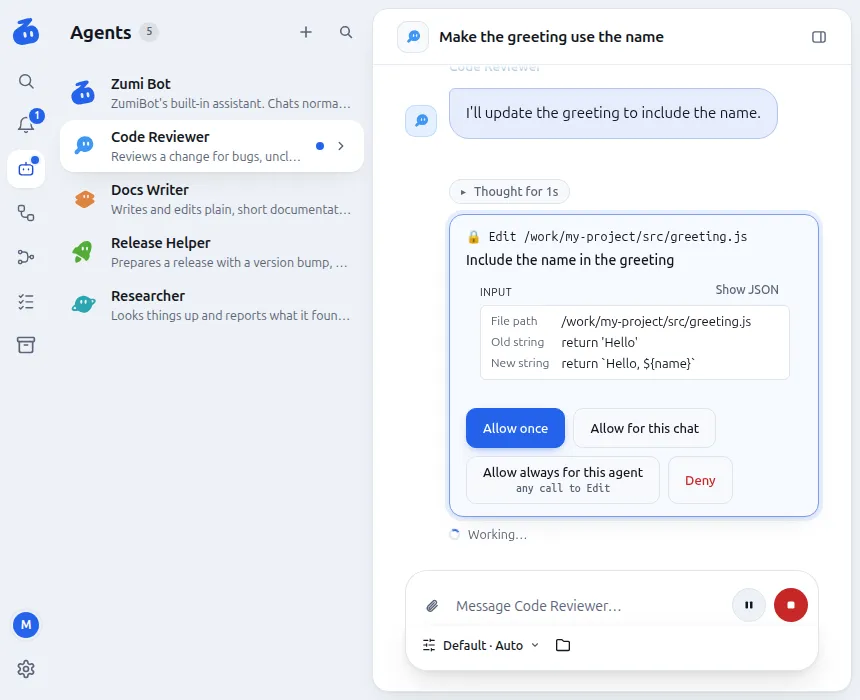
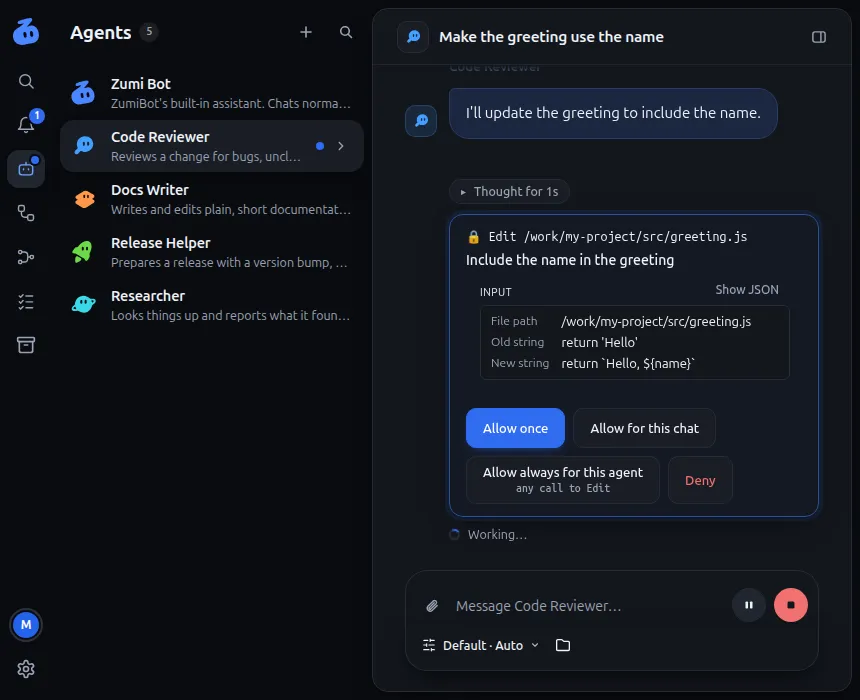
- Read the card. The title says which tool and what it works on. Choose the title to open or close the Input panel, which lists the fields the agent sent. Choose Show JSON to see the exact text instead, and Show fields to go back.
- Pick an answer.
- Allow once runs this one call. The card then reads “Allowed once”.
- Allow for this chat runs the same call again in this chat without asking. The card reads “Allowed for this chat”. For a command, “the same” means this exact command, as the small line under the button says.
- Allow always for this agent remembers the answer for every chat with this agent. The small line says what it covers, for example “any call to Edit”.
- Deny refuses. The agent is told no and goes on without it.
Once you answer, the buttons are replaced by a line that states your answer. A later call that a remembered answer covers shows “Auto-allowed (earlier “Allow for this chat”)” or “Auto-allowed (remembered for this agent)”, with no card to answer.
Some cards offer only Allow once and Deny, because they ask every time. Deleting a routine or a workflow is one.
Take back a remembered answer
Section titled “Take back a remembered answer”Open the agent with Edit agent in its sidebar menu. The Remembered approvals card lists what you allowed. Choose the × beside a row to forget it. The agent asks again the next time.
Tips for approvals
Section titled “Tips for approvals”- When in doubt, use Allow once.
- Read the Input before you allow a command. A short title can hide a long command.
- There is no mode that skips every approval, and you cannot make one.
When Auto mode refuses a command
Section titled “When Auto mode refuses a command”In Auto, Claude Code sometimes refuses a command on its own, such as one that deletes a branch. No approval card comes, and the agent usually stops and tells you it was refused. ZumiBot then shows a card in the chat, under the agent’s steps, titled “Auto mode refused a command”. It looks like a question card and is part of the conversation, not a pop-up.
- Read the card. It shows the refused command and lists its parts. Each part you can allow has a box and a short start of the command, for example
git branch -D. Harmless parts, such ascd, start unticked. A part that starts a shell or a wrapper, such asbash,python,sudo,timeoutornohup, cannot be allowed, so it stays unticked with the reason under it. If the command first changes into a folder outside the chat’s folder, for examplecd /home/you/other-repo && gh pr merge 12, the card lists that folder as its own part, ticked. Claude Code checks such a folder before any command rule, so allowinggh pr mergealone would not be enough. Allowing the folder lets the agent read its files and change into it, not change its files. The card does not offer your home folder or a folder near the top of the disk, such as/etc. - Check what you allow. You can edit a start or untick a part. The card shows the exact rules it will make, such as
Bash(git branch -D:*), which means any command that starts withgit branch -D, orRead(//home/you/other-repo/**)for a folder. Claude Code ignores rules that start with a shell, and a rule for a wrapper would run any command, so those are refused. A git rule must name what git does, such asgit push:gitalone, orgitwith only options like-C /repo, would allow every git command, so it is refused. - Pick where it applies. This chat is the default. Always for the agent remembers it for every chat with that agent, and also for that agent’s unattended runs (routines, workflows and channel chats), as “Allow always for this agent” already does.
- Choose Allow and continue. ZumiBot saves the rules and sends a message that says what you allowed, so the agent tries again. The card then shrinks to one line that reads “Allowed for this chat” or “Allowed for” the agent. A fork of the chat starts without a chat-only rule, so you allow it again there.
While the agent is replying, the card is there but the button waits. A refusal from an earlier turn shows as one line with an Allow… button that opens the card in place.
These rules work in Auto, Ask permissions and Accept edits, and never in Plan mode, so a plan stays read-only. Only you can add one: an agent cannot allow things for itself. Your own Claude Code settings still win, so a command you set to always ask still asks. The card does not appear for refusals you caused yourself, for example by choosing Deny, or in Zumi Bot’s own chat or a workflow’s chat. If the agent is refused again, the card says Claude Code still refused it although the rules are allowed.
A command with a part that cannot be allowed, such as python3 writing a file, is refused as a whole, however many of its other parts you allowed. When everything else in it is already allowed, the card has no button: it names that part and lists the rules you already have. Ask the agent to do it another way, without that part, for example by writing the file itself and then running the other command on its own.
Claude Code always asks about a command that changes into another folder and then runs git there, such as cd /home/you/other-repo && git push, because the folder’s own git settings could run code. In Auto, its classifier answers that question instead of you, and no rule changes it, so allowing git push as written would only see the same command refused again. The card therefore offers the git parts as git -C /home/you/other-repo push, which runs git in that folder without changing into it, and Allow and continue also tells the agent to run git that way. If the agent still runs git after cd, the card says so and its Ask to use git -C button asks the agent again.
Questions
Section titled “Questions”An agent can stop to ask you something. A question card has one or more questions.
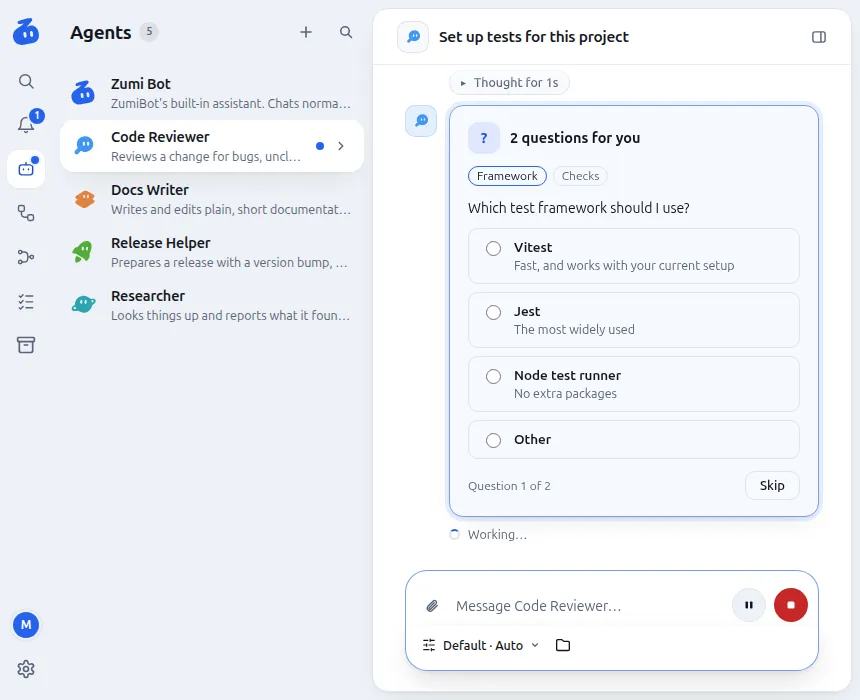
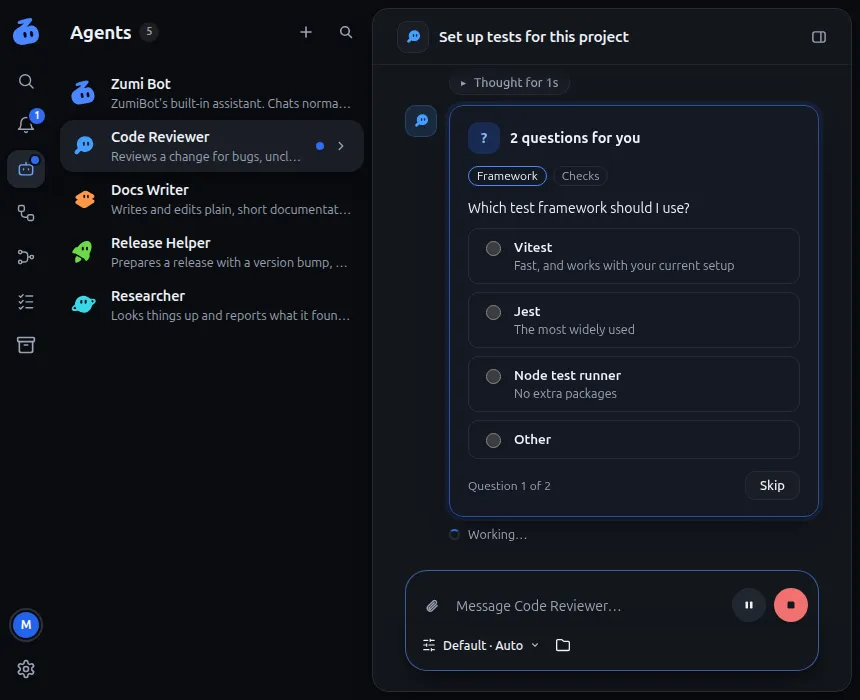
- Answer each question. Choose an option. A question that takes one answer moves on to the next question by itself. A question that allows several shows boxes, and Next moves on once you have ticked what you want.
- Write your own answer. Choose Other and type in the box that says “Type your own answer”. Some questions ask for text or a number instead of options.
- Move around. With more than one question, the tabs at the top and Back go between them. “Question 1 of 2” tells you where you are.
- Send. On the last question, choose Send answers. It stays gray until every question has an answer. Choose Skip at any point to leave the questions unanswered.
In a text box, Enter sends and Shift+Enter starts a new line. After you answer, the card reads “Answered” and shows what you picked. After a skip it reads “Skipped”.
Sometimes an agent writes a plan before it changes anything. A plan card shows the plan and waits for you. It is most common in a chat in Plan mode, where the agent reads and plans and changes nothing until you approve.
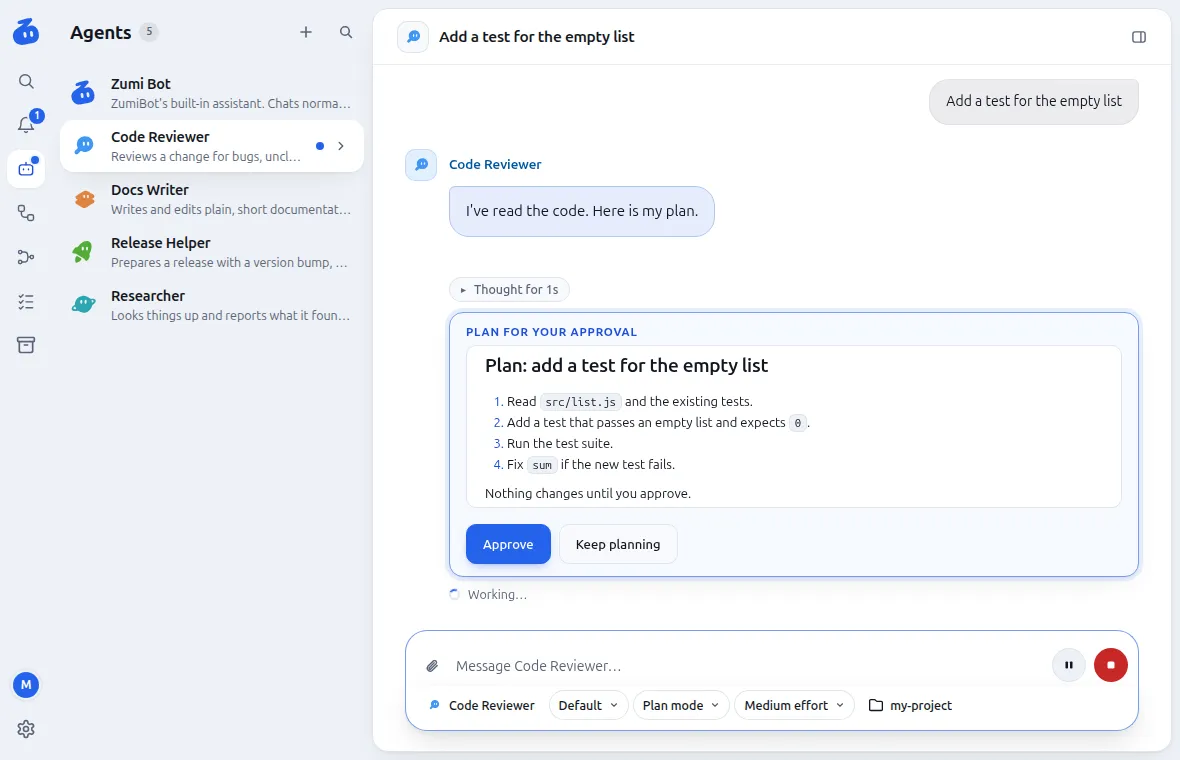
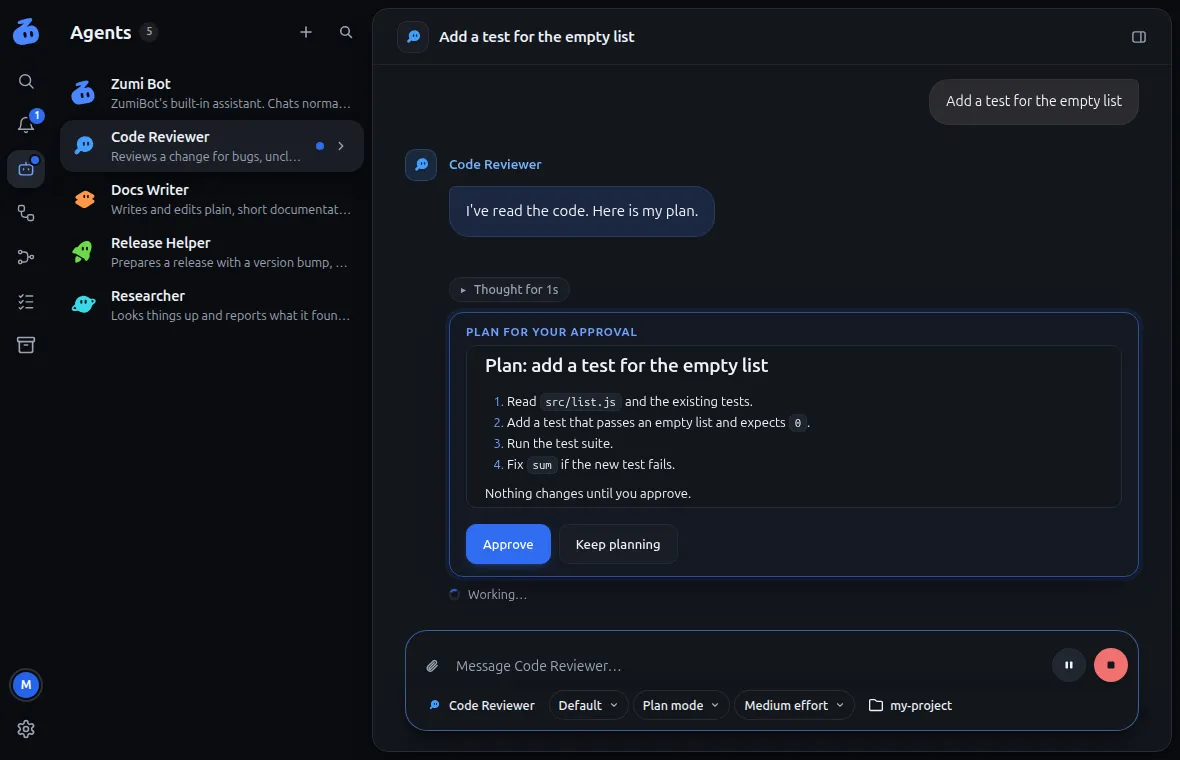
- Approve lets the agent start. In a chat that was in Plan mode, the chat goes back to Auto at that moment. The card reads “Approved”.
- Keep planning sends the agent back to revise. A box opens that says “What should change? (optional)”. Write what you want different, then choose Send, or choose Cancel to go back to the two buttons. The card reads “Sent back” and keeps your note.
The agent then writes a new plan and asks again. A plan is never approved for you and never remembered.
Limits
Section titled “Limits”- If the reply ends before you answer, for example you pressed Stop or the server restarted, the card reads “Not answered”.
- Plans are offered by Claude Code agents only, so a Codex agent or an ACP or remote agent never shows a plan card. All of them can ask questions. A remote agent’s question shows as a card only when its server describes it in a form ZumiBot can show.
Related
Section titled “Related”- Your first chat
- Chats and the message box
- Mode, effort and model
- Pause and Resume
- Agent asks
- Dispatched agents
- Background processes
- Inbox
- Notifications
- Telegram and Slack
- Jev: the optional risk hint on an approval card.