
ACP & AG-UI
Most people never need this page. It is for people who already run an agent that is not Claude Code and not Codex, and want to chat with it in ZumiBot. There are two ways to connect one.
- ACP agent connects an agent that runs on the same computer as your ZumiBot server and supports ACP. ACP stands for Agent Client Protocol, a standard way for an app to talk to a coding agent. ZumiBot starts the agent and talks to it.
- Remote agent (AG-UI) connects an agent that runs on someone else’s web server. AG-UI is a standard way for an app to talk to an agent over the web. ZumiBot sends your messages to the server’s address.
You choose either one in Agent Studio, in the Engine list. For a Codex agent, see Codex agents. That page also has a table of what works on each kind of agent.
Both kinds cover less than Claude Code does. Read the limits below before you rely on one.
Connect an ACP agent
Section titled “Connect an ACP agent”You need the agent installed on the computer that runs your ZumiBot server: your PC in Local mode, your server otherwise. Sign it in with its own tool first. ZumiBot cannot sign it in for you. If it signs in with an API key instead, see the Sign-in keys step below.
-
Open Agent Studio and make a new agent, or open one. See Agent Studio.
-
Open the Engine list and choose ACP agent. A card headed “ACP agent”, with “Agent Client Protocol” beside it, appears.
-
Fill in Command and Arguments. Command is the name of the program, which ZumiBot finds on this computer’s PATH, or its full path. Arguments go one per line. Take both from the agent’s own documentation, for the line that starts it in ACP mode. As an example only,
geminiwith the argument--acpis what Gemini CLI’s own documentation gives. We have not tried it, so check the documentation of the agent you use. -
Pick Sign-in keys, if the agent needs them. An agent that signs in with an API key can get one from your Vault. Save the agent first. Then, in Settings, Vault, tick the agent on the key. Back in the card, tick the key’s name. Until a key is granted, the card says “No API keys are granted to this agent.” The key reaches the agent as a variable under its own name. With none ticked, the agent uses its own login on this computer. Never type a key into Arguments: the agent’s file syncs as plain text, and arguments show in the computer’s process list.
-
Choose Save changes. Saving is what confirms the command on this computer. An agent whose command was changed any other way, such as by editing its file, will not run until you open it in Agent Studio and save. The chat says “This agent’s command changed outside Agent Studio. Open it in Agent Studio and save to confirm.”
-
Choose Test. It starts the saved command in an empty folder and asks the agent what it supports. No model runs and nothing is written. It lists the agent’s name and version, its protocol version, how chats continue, whether instructions go as a system prompt, whether it takes images, its sign-in methods, and “ZumiBot hides”, the features ZumiBot turns off for it. If nothing answers in 20 seconds, Test says so.
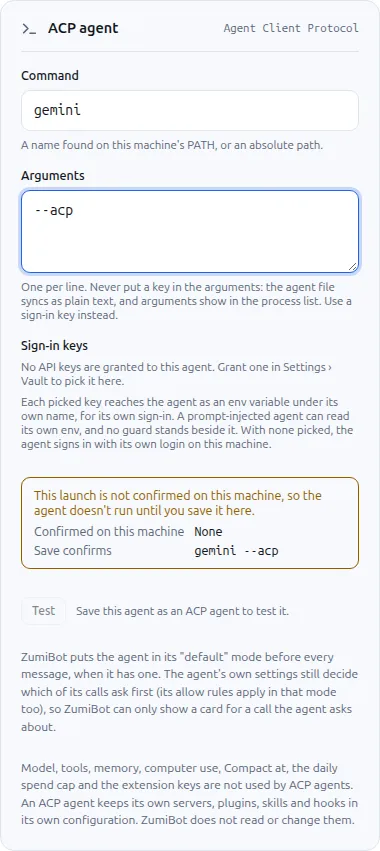
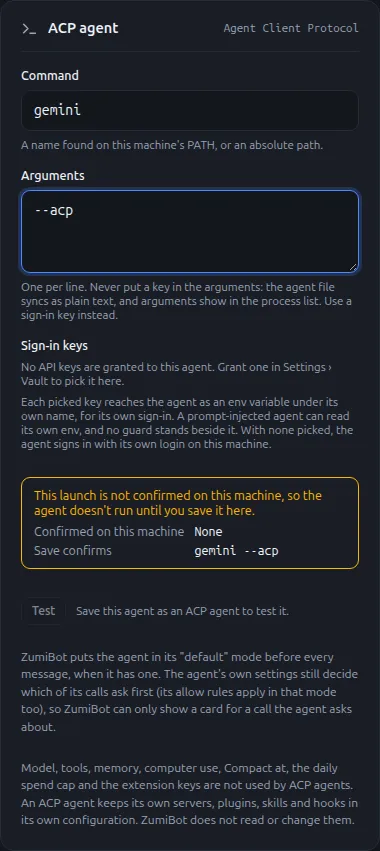
Then start a chat with the agent as usual. The sidebar shows an ACP tag beside it. A chat on an ACP agent has one mode only, Ask permissions. ZumiBot puts the agent in its own ask-first mode, called “default”, before every message when it has one. The agent’s own settings still decide which of its calls ask first, so ZumiBot can only show a card for a call the agent asks about. Some cards offer only Allow once and Deny, because ZumiBot will not remember a rule for them.
ACP limits
Section titled “ACP limits”- Allow-everything flags are refused. Save and every run refuse arguments such as
--yolo,-y,--dangerously-skip-permissions,--allow-all-toolsand--force, with a line like “ZumiBot does not run an agent with –yolo, which lets it act without asking. Remove it in Agent Studio.” This list is a speed bump. An agent’s own settings can still allow everything, and ZumiBot cannot see that. - Some features are off. There is no Pause, side questions, Compact, model or effort picker, Edit, Resend or Fork, or spend cap. An ACP agent does not get ZumiBot’s to-do, Vault, ask and browser tools, or memory, computer use or Claude Code extensions, and it cannot run in a sandbox or a container. Agent Studio hides the cards that do not apply.
- Rooms and files work. An ACP agent can be a room member, and the Files panel shows what it changed. The moderator still runs on Claude Code.
- Images and other files. An image goes along when the agent takes images. Otherwise the message is refused with “This agent cannot take images. Send the message without them.” Any other file reaches the agent as its path in the message.
- Sessions. Some agents cannot pick a chat up again. Test says so with “Each turn starts a new session and resends the chat so far”. Then every message sends the chat history again.
- Only one agent was tried. ZumiBot has been tested against one real ACP agent. We have not tried Gemini CLI, opencode or others. They follow the same protocol, but one may behave differently. Use Test first.
Connect a remote agent
Section titled “Connect a remote agent”You need the address of a server that speaks AG-UI. Several agent frameworks can serve it, such as Pydantic AI and LangGraph. ZumiBot has been tested against one of them. The address must start with https://, and it must be reachable from your ZumiBot server over the internet.
-
Open Agent Studio and make a new agent, or open one.
-
Open the Engine list and choose Remote agent (AG-UI). A card headed “Remote agent”, with “AG-UI” beside it, appears. At its top it says where your messages would go: “Runs outside this machine, at” the server’s name, “Every message of its chats, and the chat’s history, is sent there.”
-
Type the Endpoint. It must be an https address. Save checks that it resolves to a public address. Addresses on your own network, such as
localhostor192.168.1.5, are refused. -
Pick an Auth key if the server wants one. The list shows the API keys from your Vault that you granted to this agent, and None. The key is sent only in a request header and never shown. Auth header is the header’s name. Leave it empty, or
Authorization, to send “Bearer” and the key. Any other name sends the bare key. -
Choose Save changes, then Test. Test checks the address and connects. It sends no request, so no message and no key leaves your computer. It shows the host, its addresses, whether the connection is secure, the key and what ZumiBot hides.
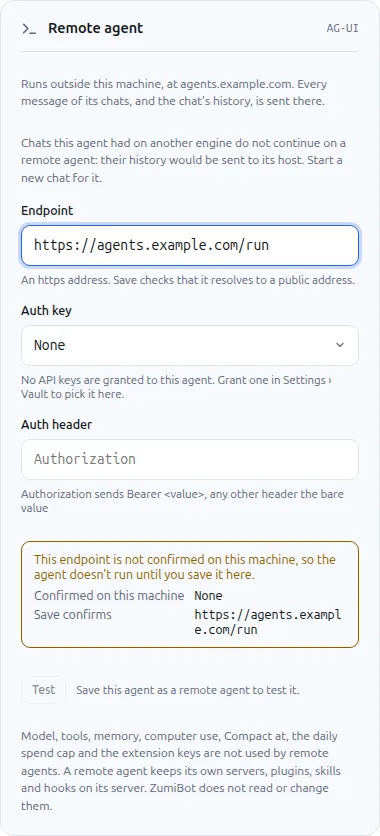
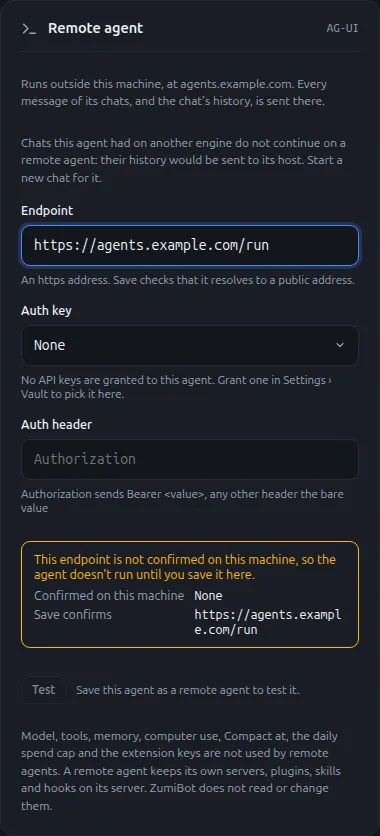
The sidebar shows a Remote tag beside the agent. In a chat, and on the new-chat screen, a chip reads “Remote ·” and the server’s name. Choose it to read the notice again. A chat on a remote agent has one mode only, Ask permissions: the remote server decides what runs, and a card shows only for an approval the server describes.
Remote limits
Section titled “Remote limits”- Everything you type leaves your computer. Each message and the chat so far go to the server on every turn. That is how the protocol works. Do not use a remote agent for text you would not send to that server.
- The agent’s instructions are not sent. The text in its Instructions box stays here. The server’s own settings decide how the agent behaves, and Agent Studio says so.
- Nothing local reaches it. It gets no files, no attachments, no Vault keys beyond its own auth key, no ZumiBot tools and no computer use. A message with an attachment is refused with “Attachments are not sent to remote agents. Send the message without them.” Its own tools run on its server, and the steps are labeled “(ran on the remote server)”.
- No chats from other engines. A chat that began on Claude Code or Codex does not continue on a remote agent, because its history could hold file contents. It says “This chat began on another engine, so its history is never sent to a remote agent: start a new chat for this agent.” Start a new chat.
- Fewer features. No Pause, side questions, Compact, model picker, spend cap, group rooms or Files panel. Other agents cannot ask it, and it cannot ask them. Edit, Resend and Fork work.
- Zumi Bot, voice and Jev never pick it for you. Only you choose a remote agent.
- Time limits. ZumiBot ends a run if the server does not connect in 10 seconds, does not start answering in 30 seconds, sends nothing for 120 seconds, or runs for more than 30 minutes.
- Routines and workflows. A remote agent runs in a routine or a workflow’s Agent step where you picked it.
Related
Section titled “Related”- Codex agents: the table of what works on each kind of agent.
- Agent Studio
- Vault: where API keys are kept.
- Mode, effort and model
- Approvals, questions and plans