
Audit log and isolation
Two features help you trust agents that act on their own. The audit log is a record of every tool call an agent made, and who allowed it. Isolation limits what one agent can do: which folders it can change and which hosts it can reach.
The audit log
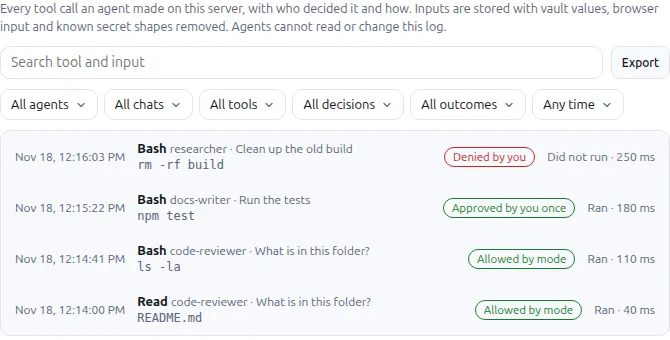
Section titled “The audit log”An agent works by calling tools: it reads a file, runs a command, opens a page. ZumiBot writes one record for each call, in single chats, group rooms, routines, workflow steps, questions asked between agents, /btw side questions and the helpers an agent dispatches. Each record says which agent, which chat, which tool, and who decided the call could run: you, a rule, the mode, or ZumiBot itself. Open it in Settings, Audit log.
Find a call
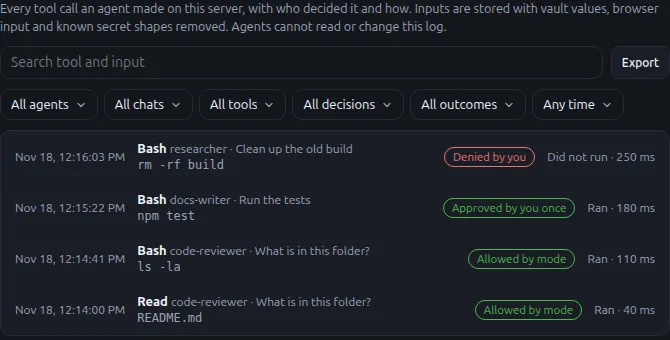
Section titled “Find a call”The list shows the newest call first, with its time, tool, agent, chat, a one-line summary of the input, a decision chip, and the outcome with how long it took. More rows load as you scroll.
- Search tool and input looks in the tool name and the input.
- The filters narrow it by agent, chat, tool, decision and outcome. Any time offers Last hour, Last day, Last week and Custom…, which shows From and To dates. Clear resets them all.
- New records — show them appears when something was logged while you were looking. It does not move the list under you.
Read a record
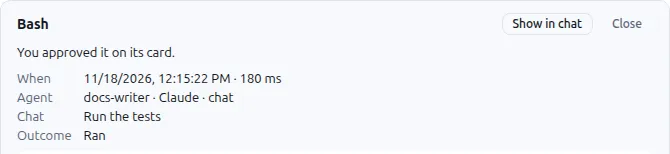
Section titled “Read a record”Choose a row. A card opens above the list with the decision in words (“You approved it on its card.”), when it ran and for how long, the agent, the chat, the outcome, and the full record below. Show in chat jumps to the call in its chat. Side questions have no such button. A chat you deleted reads “Deleted chat”.
The decision chips mean:
| Chip | What happened |
|---|---|
| Allowed by mode | No approval reached ZumiBot. The mode, a rule in your own Claude Code settings or the auto-mode check allowed it. |
| Allowed for this chat, Allowed by agent rule, Allowed by workflow step rule | A choice you made earlier on an approval card allowed it. |
| Approved by you once, for this chat, always for this agent or for this workflow step | You pressed the matching button on its card. An answered question or an approved plan counts too. |
| Allowed by ZumiBot | One of ZumiBot’s own tools, such as the to-do list or the Vault, which it allows without a card. |
| Denied by you | You pressed Deny, skipped a question or sent a plan back. |
| Denied by a rule | A deny rule refused it before any card. |
| Blocked by the sandbox | The agent is sandboxed and the call reached outside its limits. The folder or host is named. |
| Denied by the vault guard, the audit guard, the pause hook, the spend cap, the side-question guard or a hook | A safeguard stopped it. |
| Refused: … | ZumiBot itself refused it, for example because the message was not yours. |
| Unanswered | A card was still open when the run ended. |
The outcome is Ran, Failed, Did not run, Interrupted or No result. An agent set up to run on a different tool is recorded too. If its tools run on its own server, the chip reads “Ran on the remote server”.
What is stored
Section titled “What is stored”The log holds the tool and its input, not what came back. The result of a call is often a whole file or page, and your chat already has it. A failed call keeps its error text.
Before anything is written, ZumiBot removes secrets from the input:
- Values from your Vault become
[vault: <name>]. - The input of browser tools is not kept at all. For the desktop, typed text is kept only as its length.
- Text shaped like a known secret, such as an API key, a token or a private key, becomes
[secret]. This is a safety net, not a guarantee, so do not rely on it for secrets you paste into a prompt. - A very long input is cut. The record then says “cut from N characters”.
Some helper calls run no tools, so they leave no records: Compact, keep-warm, the room moderator, the room summary and voice titles.
Size, export and verify
Section titled “Size, export and verify”The footer shows this computer’s name, how many records there are, and the size of the log against a cap. Choose a cap of 128 MB, 512 MB or 2 GB. It starts at 512 MB. When the log passes it, the oldest file is deleted whole. Nothing else deletes records, and nothing expires by time.
- Export saves the records that match your filters as a file of one JSON record per line, oldest first.
- Verify chain checks that no record was changed, added or removed. It answers “Chain intact (N files)” or “Chain broken at” and the file and line. This catches careless changes. It cannot stop someone who can write the files, and removing the very newest records before a restart goes unseen.
- If a record could not be written, the footer says “N records could not be written since the server started”. Work goes on without it: the log never stops a reply.
The log belongs to one computer and is never synced. If you use both your PC and a server, each keeps its own, and you can export both.
Agents cannot read or change the log. ZumiBot blocks their file tools and shell commands from its folder, and no tool reads it. As with the Vault, that guard is a speed bump for an agent running as your user, and a wall for a sandboxed one.
A workflow run also has its own Audit log tab, which covers just that run. See Workflows.
Isolation
Section titled “Isolation”By default an agent can do anything you can on this computer, and its commands are limited only by the approvals you give. Isolation adds a hard limit for one agent. It does not replace approvals: cards, modes and remembered approvals work the same.
You set it per agent. Every agent starts at Off.
| Level | What it does |
|---|---|
| Off | No limit beyond approvals. |
| Sandboxed | The agent’s shell commands run in your system’s sandbox. Its file tools stay in its own folders. Its network reaches only hosts on your list. |
| Container | Not ready yet on a normal ZumiBot install. |
Sandbox an agent
Section titled “Sandbox an agent”-
Open the agent in Agent Studio and scroll to Isolation. It appears for an agent you have saved.
-
Choose Sandboxed. If your computer cannot sandbox, the choice is grayed out and the card says “Sandboxed is unavailable:” with the reason. On Linux you need the
bubblewrapandsocatpackages, and some systems block bubblewrap by default. Install them on the computer that runs your server. -
List the hosts it may reach. Write one per line in the Network box, and use
*.example.comfor subdomains. An empty box means no network at all. -
Add folders if it needs them. Extra folders it may change and Extra folders it may only read take one absolute path per line.
-
Decide on the two switches. Allow web search is off unless you tick it. Run sandboxed Bash without asking is a looser choice: commands in the sandbox no longer show an approval card. Leave it off unless you are sure.
-
Choose Save isolation. The card says “Saved. It applies from the next turn.” This button is separate from Save changes for the rest of the agent. Revert undoes what you have not saved.
Once you pick a level, the card sums up the limits in four lines: Every run may change, May read, May reach and Outside the sandbox. Read them before you save.
What changes for a sandboxed agent:
- Shell commands can change only the chat’s folder (or its worktree), its own temporary folder, its memory and the extra folders you listed. They can read system folders such as
/usrand/etc, but not your home folder. They reach only listed hosts. - File tools (Read, Edit, Write and the search tools) are held to the same folders. A blocked call reads “Blocked by the sandbox:” followed by the path and “is outside this agent’s folders.”
- Web fetches to a host that is not on the list are refused.
- Nothing runs outside the sandbox quietly. If the sandbox cannot start, the run is refused with the reason. It does not run with less protection.
- ZumiBot’s own tools still work, such as the to-do list and the Vault.
What a sandbox does not stop
Section titled “What a sandbox does not stop”- Files that run later. An agent can change a file in its folder that you will run yourself, such as a
package.jsonscript or aMakefile. Review changes the way you would a stranger’s code. - Git. It can commit to the repository, and in a worktree chat that repository is shared with your own checkout. Git hooks and settings are protected.
- Anything it can read, sent to a host on its list. That includes an API key from your Vault. A listed host that serves content from other people, such as a paste site, is a way out.
- Its own servers, the browser and computer use. MCP servers and hooks it loads run outside the sandbox with full access. The agent’s browser and computer use do too. The card says so.
Container
Section titled “Container”Container, a third level, is not ready on a normal ZumiBot install yet, so leave it at Off or Sandboxed.
Tips and limits
Section titled “Tips and limits”- Start with Sandboxed for agents that run code you did not write, or work on a repository you do not trust. An agent that only chats needs none.
- It applies from the next turn, not to a reply that is already running.
- It is saved on this computer, not in the agent’s file. That is on purpose: Zumi Bot cannot lower an agent’s isolation, and the setting does not sync to your server. Set it on each computer that runs the agent.
- Rename in Agent Studio. If an agent is renamed another way, such as editing its file, its isolation stays with the old name and the new name starts at Off.
- Only some agents can be isolated. An agent set up to run on a different tool cannot be. Both choices are grayed out, and the card says why.
- Look at the audit log. Calls the sandbox stopped show as Blocked by the sandbox, with the folder or host.
Related
Section titled “Related”- Vault
- Approvals, questions and plans
- Agent Studio
- Memory and remembered approvals
- Servers, plugins, skills and hooks
- Computer use and the agent’s browser: both run outside a sandbox.