
Connectors
A connector lets an agent use another service, such as your email, calendar or issue tracker. You connect the service once on claude.ai, then switch it on for each agent that may use it. ZumiBot does not store your sign-in. It only decides which agents can use what.
The services are Gmail, Google Calendar, Google Drive, Notion, GitHub, Slack and Linear.
What you need
Section titled “What you need”Connectors come from your claude.ai account, so Claude Code must be signed in with a claude.ai subscription. If your ZumiBot server uses an API key or a token instead, Claude Code loads no connectors. The page then shows a notice naming the setting in use and telling you to sign in with claude /login on a Claude subscription and remove that setting from the server’s environment. It never shows the value.
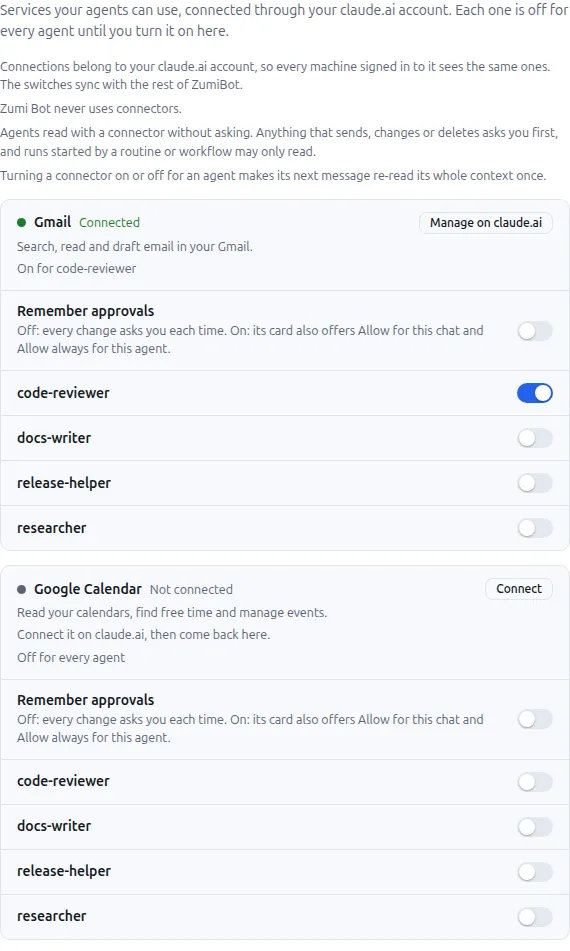
Connections belong to your claude.ai account, so every machine signed in to it sees the same ones. The switches in ZumiBot sync with the rest of your settings.
Connect a service and turn it on
Section titled “Connect a service and turn it on”-
Open Settings, then Connectors. Each service has a card with its state and a short line on what it can do.
-
Choose Connect. It opens the service’s page on claude.ai in your browser. Sign in and allow access there, following claude.ai’s own instructions. ZumiBot never sees the sign-in.
-
Come back to ZumiBot. The page checks again when you return to the tab, so the card changes to Connected within a few seconds.
-
Switch the service on for an agent. Each card has one switch per agent. Agents start off. The line on the card says “Off for every agent” or “On for” and the agent names.
-
Ask the agent to use it. For example, ask it to search your inbox for a message. The agent can now call the service.
A card is in one of these states:
| State | What to do |
|---|---|
| Connected | Nothing. The button reads Manage on claude.ai. |
| Needs attention | Choose Reconnect, and sign in again on claude.ai. If every card shows this, run claude /login on the machine that runs ZumiBot. |
| Not connected | Choose Connect, then come back. |
| Turned off in Claude Code | It is connected, but turned off in Claude Code’s own settings. |
| Not checked | Claude Code could not list your connectors just now. Try again in a moment. |
GitHub
Section titled “GitHub”GitHub has no ready-made connector on claude.ai. Its card shows an address with a Copy button. On claude.ai, open Customize, then Connectors, then Add custom connector, and paste that address. Then switch it on for your agents as for any other service.
Reading is free, changing asks you
Section titled “Reading is free, changing asks you”An agent reads with a connector without asking. That covers searching your mail, listing events, reading files and pages, and similar. Anything that sends, creates, edits, moves, shares or deletes asks you first. A draft counts as a change.
In a chat you sit in front of, a change shows an approval card. Its head names the service and the action, for example “Gmail · send_message”. It says “As connected on claude.ai”, because ZumiBot cannot see which account you connected. It shows what the agent wants to send, and offers Allow once and Deny.
If you want fewer questions, the card’s service has a Remember approvals switch on the Connectors page. Off, every change asks each time. On, the card also offers Allow for this chat and Allow always for this agent. Leave it off unless you trust the agent with that service.
Routines and workflows run without you, so they may only read. When one tries a change, the agent gets a message such as “Gmail send_message changes data outside this machine. Runs started by a routine or workflow may only read; ask the user to do this in a chat.” The run goes on and reports it. It does not wait for you. A room opened by a routine or workflow stays this way until you type into it.
A tool ZumiBot does not know yet is treated as a change. The card then lists “Tools ZumiBot does not know yet”.
Tips and limits
Section titled “Tips and limits”- Only some agents get a switch. An agent set up to run on a different tool cannot use claude.ai connectors, and the page says so. Zumi Bot never uses connectors.
- If you used connectors before this page existed, ZumiBot kept them on for those agents the first time it started, so nothing stopped working. Everything you connect later starts off.
- A switch costs one re-read. Turning a connector on or off for an agent makes its next message read its whole context once.
- A connector that is off is off for real. The agent cannot use it, and trying gives “is not turned on for this agent on the Connectors page”.
- Your own servers are separate. Servers you set up yourself are on Settings › Claude Code. See Servers, plugins, skills and hooks. A connector’s row in Agent Studio says “Set on the Connectors page” and links here.
- Traffic goes through Anthropic. Connector calls travel through claude.ai, not straight from your machine to the service.